
Quadrat Font — Free Download (TTF, OTF, SVG)

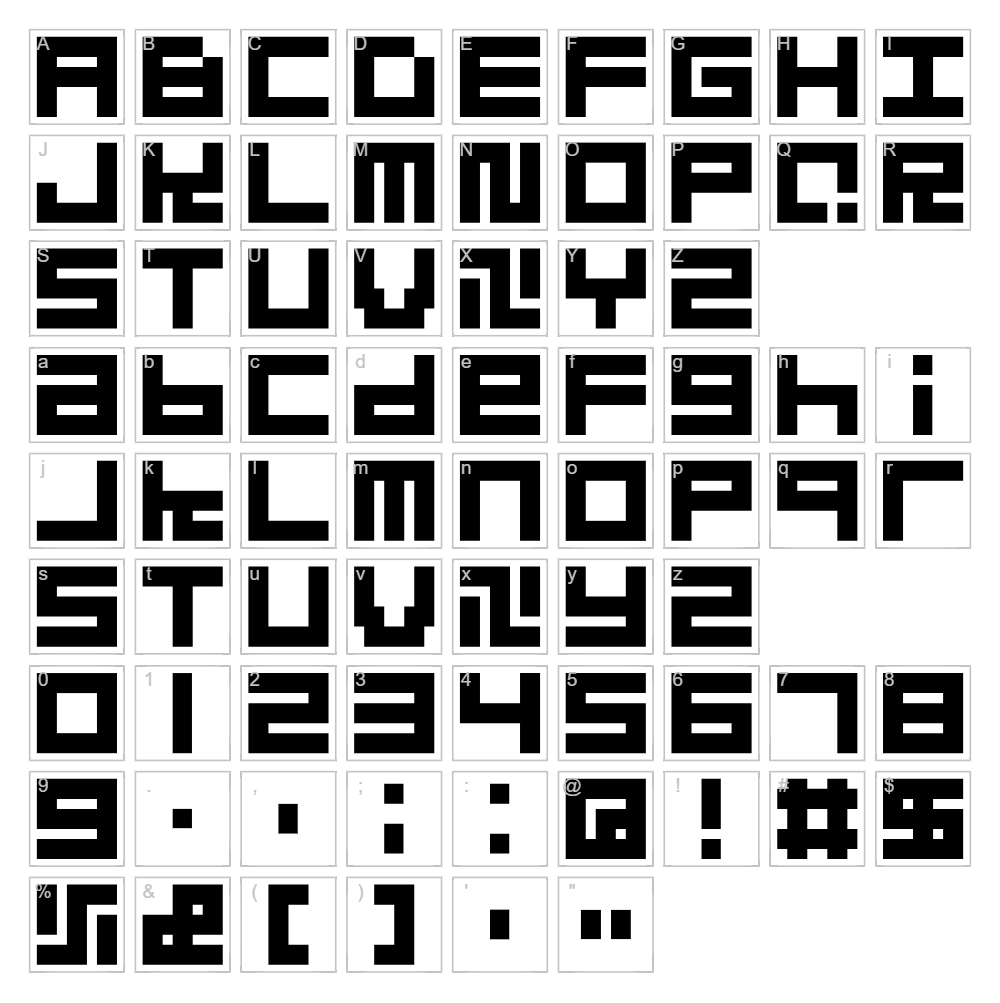
About Quadrat
Quadrat is a distinctive bitmap font designed by windsplite that captures a geometric, pixel-perfect aesthetic with sharp, angular letterforms. The font features uniformly structured blocks and clean lines that give it a modern, technical appearance perfect for contemporary design work. Its monospaced character and blocky construction make it instantly recognizable, evoking a sense of digital precision and retro-futuristic charm. Quadrat stands out for its versatility—equally at home in minimalist layouts or bold graphic statements.
Best Uses for Quadrat
Quadrat excels in logo design, branding, and headline typography where bold geometric impact is desired. It's ideal for tech-focused projects, poster design, vinyl decals, and Cricut crafts that demand visual punch and clarity. The font's bitmap structure also makes it excellent for digital signage, app interfaces, and retro-inspired merchandise designs.
What Fonts Pair Well With Quadrat?
Quadrat pairs beautifully with clean, minimalist sans-serif fonts that don't compete for visual attention. Consider pairing it with Roboto or Inter for body text and supporting typography. For contrast, Playfair Display adds elegant sophistication while maintaining visual balance alongside Quadrat's geometric boldness.
License & Commercial Use
Quadrat is 100% free for commercial use. You are permitted to use this font in logos, print materials, digital designs, web projects, mobile applications, and merchandise without restriction. Commercial licensing fees are not required. Attribution to designer windsplite is appreciated but not mandatory. The only restriction is reselling or redistributing the font files themselves—the typeface must remain free for all users.
Frequently Asked Questions
Is Quadrat free for commercial use?
Yes. Quadrat is completely free for commercial projects including logos, packaging, print advertising, digital media, websites, apps, and merchandise.
What file formats does Quadrat come in?
Quadrat is available in standard web and desktop formats including TTF (TrueType) and OTF (OpenType), compatible with Windows, Mac, and Linux systems.
What fonts pair well with Quadrat?
Roboto, Inter, and Playfair Display work excellently with Quadrat. See Section 3 for detailed pairing recommendations and reasoning.
Is Quadrat suitable for body text in long-form content?
While Quadrat's bitmap structure is striking for headlines and display use, its geometric design is less ideal for extended body text. Reserve it for titles, callouts, and accent typography where its bold character enhances readability and visual interest.
How to Install Quadrat
- Download the Quadrat font file from VectorDad to your computer.
- Unzip the font folder if it arrives in a compressed file format.
- Double-click the TTF or OTF font file to open the font installer dialog.
- Click "Install" to add Quadrat to your system's font library.
- Restart your design application and Quadrat will appear in your available fonts list, ready to use across all programs.
Use Quadrat With VectorDad Tools
Maximize Quadrat's impact by using the VectorDad Word Art Generator to create custom text designs ready for Cricut cutting. For curved designs and circular text layouts, the Curved Text Generator pairs seamlessly with Quadrat's bold geometric style, letting you bend and shape your typography into unique vinyl decal and craft-ready SVGs.
Make Your Own Font
Like the look of Quadrat Font but want letters in your own style? Draw or trace each character as an SVG, then turn the set into an installable .ttf font with our SVG to TTF converter. It runs in your browser, with no signup.


