Sego Font – Free Download (OTF, TTF, SVG)

Character Map
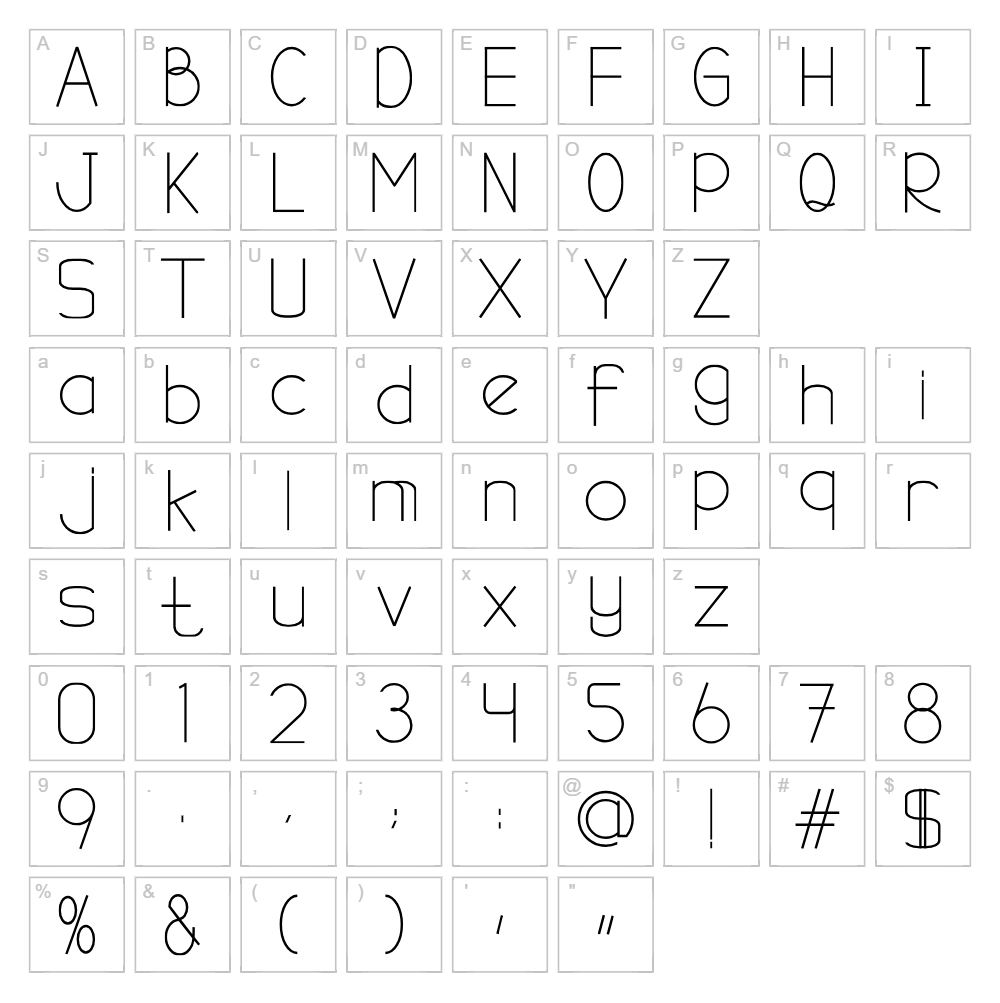
Download Sego Font
Downloads as a ZIP file. Check the license notes on this page before commercial use.
Font Files
- Sego-Jagung.ttf
Font Details
- License:Free for personal use
- Author:
About Sego
Sego is a versatile typeface designed by Ishmael Studio that combines clean geometry with approachable letterforms suitable for a wide range of creative projects. The font features consistent stroke weights and balanced proportions that work equally well at display sizes or smaller text applications. Its neutral personality makes it a reliable choice for designers seeking a workhorse font that remains visually interesting without demanding attention. Sego's straightforward design philosophy ensures excellent legibility across digital and print media.
Best Uses for Sego
Sego excels in applications requiring clarity and professional appearance, making it ideal for branding, logo design, and corporate identity systems. The font performs particularly well for Cricut vinyl decal projects, t-shirt designs, and signage where legibility is paramount. Its balanced aesthetic also suits digital interfaces, web design, and editorial layouts where a friendly yet professional tone is desired.
What Fonts Pair Well With Sego?
Sego pairs beautifully with serif options like Lora or Crimson Text for sophisticated editorial layouts. For a modern sans-serif pairing, consider Inter or Roboto to create visual hierarchy while maintaining design cohesion. These combinations work across print, web, and creative projects while remaining freely available through Google Fonts.
License & Commercial Use
Sego is available for free personal and commercial use. This includes creating logos, designing print materials, developing digital products, building websites, creating mobile applications, and producing merchandise. You may use Sego in any professional or commercial context without purchasing a license, provided you credit Ishmael Studio in your project documentation. However, you may not resell, redistribute, or modify the font files themselves for resale or as your own font product.
Frequently Asked Questions
Is Sego free for commercial use?
Yes. Sego is free for both personal and commercial use, including logos, marketing materials, merchandise, web projects, and digital applications. Credit to Ishmael Studio is appreciated but not always required.
What file formats does Sego come in?
Sego is typically available in standard font formats including TTF (TrueType) and OTF (OpenType), ensuring compatibility with Windows, macOS, and design software like Adobe Creative Suite, Cricut Design Space, and Silhouette Studio.
What fonts pair well with Sego?
Sego pairs well with serif fonts like Lora and Crimson Text, or modern sans-serifs like Inter and Roboto. See our full pairing recommendations in the Font Pairing section above for more detailed suggestions.
Can I use Sego in Cricut Design Space projects?
Yes. Once installed on your computer, Sego appears in Cricut Design Space and all other creative software. For even faster workflow, use our Word Art Generator or Curved Text Generator to create pre-made SVG designs with Sego that you can import directly into your cutting projects.
How to Install Sego
- Download the Sego font file from VectorDad.com to your computer.
- Unzip the downloaded folder to reveal the font files inside.
- Double-click the Sego font file (TTF or OTF format) to open the font preview window.
- Click the Install button to install the font to your system.
- Restart your design applications and Sego will appear in your font list, ready to use.
Use Sego With VectorDad Tools
Maximize your workflow by using the VectorDad Word Art Generator to instantly create professional Sego text designs in SVG format ready for Cricut projects. Combine this with the Curved Text Generator to bend Sego letterforms along custom paths, perfect for circular logos, labels, and decorative vinyl applications.
Make Your Own Font
Like the look of Sego but want letters in your own style? Draw or trace each character as an SVG, then turn the set into an installable .ttf font with our free font creator. It runs in your browser, with no signup.