
Shadows Into Light Font – Free Download (OTF, TTF, SVG)

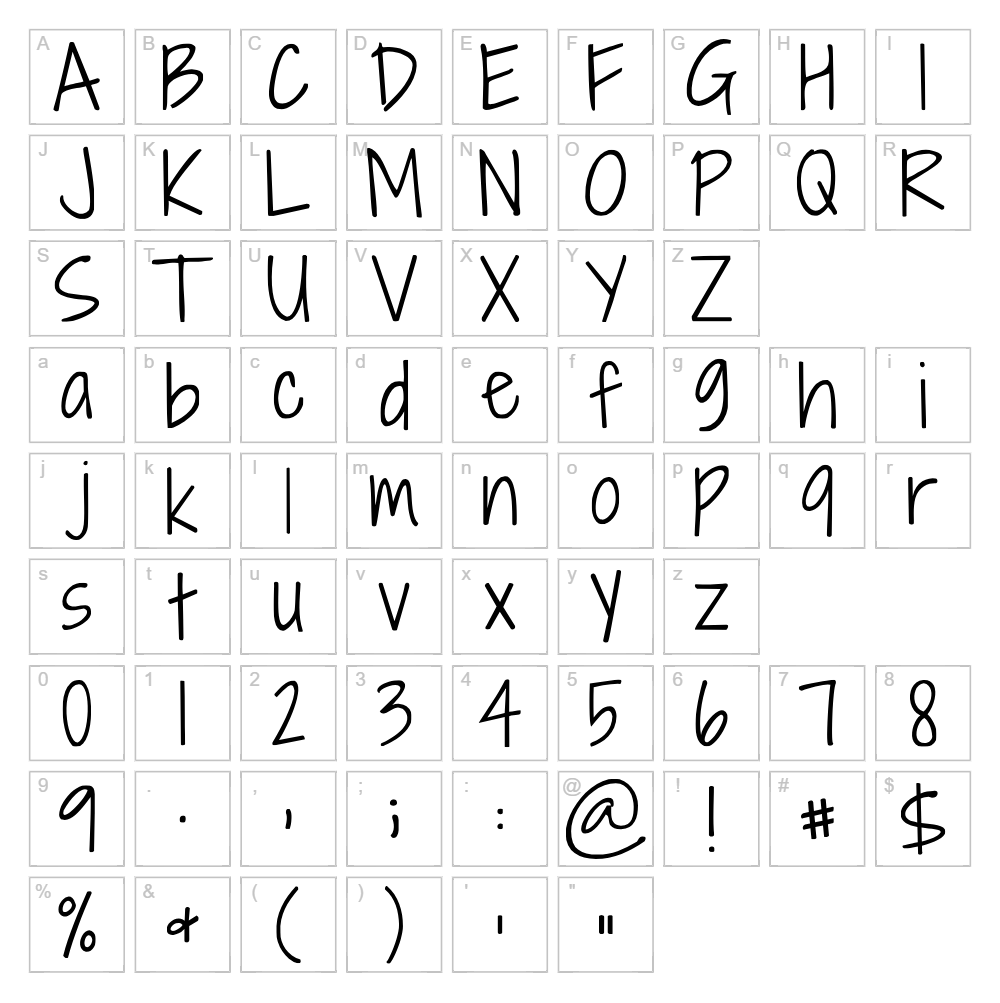
About Shadows Into Light
Shadows Into Light is a charming handwritten script font designed by Kimberly Geswein that captures the organic flow of pen-on-paper lettering with natural, slightly irregular letterforms. The font features soft, rounded strokes with a casual, friendly demeanor that conveys warmth and approachability without sacrificing readability. Its carefully crafted shadows and depth give each character dimension, making it visually interesting even at smaller sizes. This font strikes the perfect balance between whimsy and elegance, making it ideal for designers seeking a personal touch that feels genuine and human-made.
Best Uses for Shadows Into Light
Shadows Into Light excels in branding projects, greeting card designs, social media graphics, and handmade product packaging where a personal, artisanal aesthetic is desired. It's particularly effective for Cricut vinyl decals, wall art, t-shirt designs, and wedding invitations that benefit from its warm, approachable character. The font also works beautifully for blog headers, children's book illustrations, and editorial designs where a friendly, conversational tone enhances the overall message.
What Fonts Pair Well With Shadows Into Light?
Shadows Into Light pairs beautifully with clean, minimalist sans-serif fonts like Lato or Open Sans from Google Fonts, which provide strong structural contrast while maintaining the design's modern feel. For a more sophisticated pairing, combine it with Playfair Display, a serif font that balances the script's informality with classic elegance and is available free on Google Fonts.
License & Commercial Use
Shadows Into Light is free for commercial use, including logo design, branding, print materials, digital publications, web design, mobile applications, and merchandise production. You may use this font in t-shirts, vinyl decals, custom products, and client work without purchasing an additional commercial license. Credit to designer Kimberly Geswein is appreciated but not required. However, you may not resell, redistribute, or share the font files themselves—always direct others to download from the official source.
Frequently Asked Questions
Is Shadows Into Light free for commercial use?
Yes, Shadows Into Light is completely free for commercial projects including logos, branded materials, merchandise, and client work. Simply credit Kimberly Geswein when possible.
What file formats does Shadows Into Light come in?
Shadows Into Light is available in standard font formats including TrueType (.ttf) and OpenType (.otf), compatible with Windows, Mac, and most design applications including Cricut Design Space.
What fonts pair well with Shadows Into Light?
Shadows Into Light pairs excellently with minimalist sans-serifs like Lato or Open Sans for modern designs, or with serif fonts like Playfair Display for more elegant, sophisticated projects.
Can I use Shadows Into Light for Cricut projects?
Absolutely! Shadows Into Light works perfectly for Cricut designs including vinyl decals, iron-on transfers, and cut files. You can upload the font directly in Cricut Design Space or create SVG word art using the VectorDad Word Art Generator for enhanced creative possibilities.
How to Install Shadows Into Light
- Download Shadows Into Light from VectorDad or your preferred font source
- Unzip the downloaded file to extract the font file
- Double-click the font file (.ttf or .otf) to open the font preview window
- Click the "Install" button to add Shadows Into Light to your system fonts
- Restart your design applications and Shadows Into Light will be available in your font menus
Use Shadows Into Light With VectorDad Tools
Transform Shadows Into Light into stunning SVG designs using the VectorDad Word Art Generator, perfect for creating custom Cricut projects with layered effects and professional finishes. For curved text designs and circular typography, try the Curved Text Generator to unlock creative layout possibilities for your handwritten script projects.
Make Your Own Font
Like the look of Shadows Into Light but want letters in your own style? Draw or trace each character as an SVG, then turn the set into an installable .ttf font with our SVG to TTF converter. It runs in your browser, with no signup.


