
Sketch Block Font – Free Download (OTF, TTF, SVG)

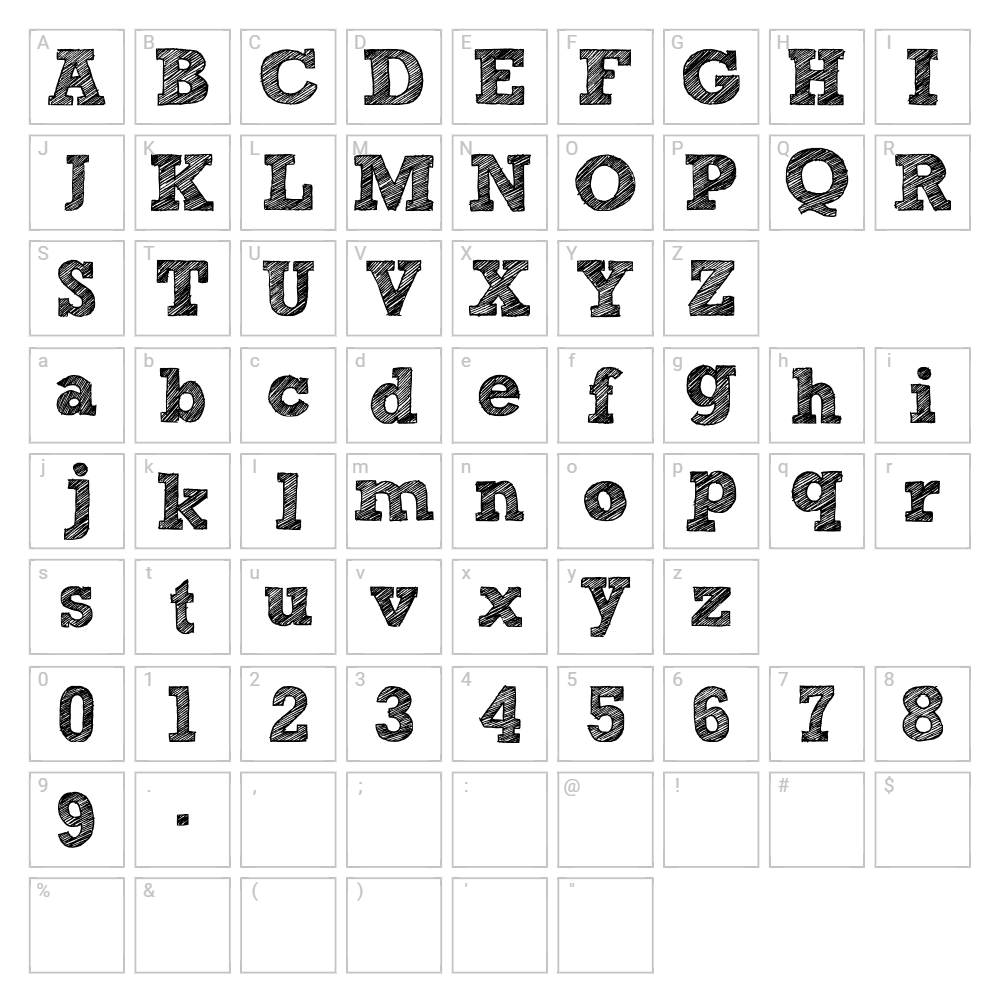
Character Map
Download Sketch Block Font
Downloads as a ZIP file. Check the license notes on this page before commercial use.
Font Files
- Sketch_Block.ttf
Font Details
- License:Free for personal use
- Author:
About Sketch Block
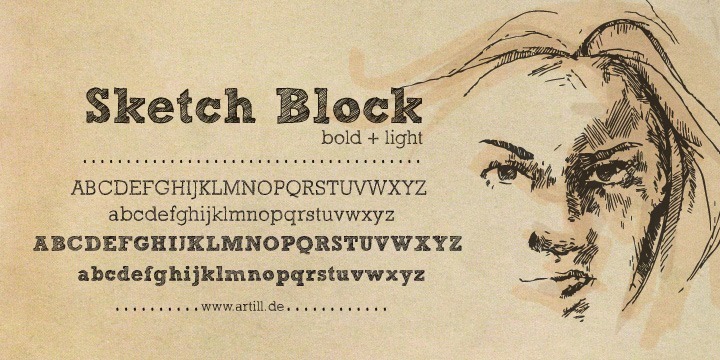
Sketch Block is a distinctive fancy typeface crafted by artill.de that captures the playful energy of hand-drawn lettering with structured geometric forms. Each character features bold strokes and intentional irregularities that evoke a sketched, informal aesthetic while maintaining legibility and visual impact. The font's unique personality makes it ideal for designers seeking something between polished typography and raw artistic expression. Its quirky charm works beautifully in contexts where personality and approachability matter.
Best Uses for Sketch Block
Sketch Block excels in creative branding, poster design, and artistic merchandising where a distinctive, friendly voice is essential. It's perfect for Cricut projects, custom t-shirt designs, vinyl decals, and hand-lettered signage that demands attention. Use it in packaging, social media graphics, editorial headers, and any project where you want to convey creativity, fun, and individuality.
What Fonts Pair Well With Sketch Block?
Sketch Block pairs beautifully with clean, minimal sans-serif typefaces like Roboto or Open Sans from Google Fonts, which provide visual balance and readability for body text. For a more sophisticated pairing, combine it with Playfair Display, a high-contrast serif that complements its artistic energy without competing for attention.
License & Commercial Use
Sketch Block is free for commercial use, including logo design, branding projects, print materials, digital publications, web design, mobile applications, and merchandise production. You may use this font in professional client work, business branding, e-commerce, and any commercial creative endeavor. Proper attribution to artill.de is appreciated but not always required. However, you may not resell, redistribute, or sublicense the font files themselves—always direct users to the original source for downloads.
Frequently Asked Questions
Is Sketch Block free for commercial use?
Yes, Sketch Block is free for commercial use. You can use it in logos, branding, print products, digital media, web projects, apps, and merchandise without purchasing a license. We recommend crediting artill.de as a courtesy.
What file formats does Sketch Block come in?
Sketch Block is typically available in standard font formats including .ttf (TrueType) and .otf (OpenType), compatible with Windows, Mac, and Linux systems. Check the download package for all included formats.
What fonts pair well with Sketch Block?
Sketch Block pairs excellently with minimalist sans-serifs like Roboto and Open Sans for contrast, or with elegant serifs like Playfair Display for a more refined aesthetic. The key is balancing its playful character with cleaner typefaces.
Can I use Sketch Block for Cricut cutting projects?
Absolutely! Sketch Block is ideal for Cricut cutting and design projects. Its bold strokes and clear letterforms cut cleanly on vinyl, cardstock, and other materials. Use VectorDad's design tools to create custom Cricut SVGs with Sketch Block.
How to Install Sketch Block
- Download Sketch Block from the font source or artill.de website.
- Unzip the downloaded file to access the font files.
- Double-click the .ttf or .otf font file to open the font preview window.
- Click the Install button to add the font to your system library.
- Restart your design applications (Adobe Creative Suite, Canva, Cricut Design Space, etc.) and Sketch Block will appear in your font list.
Use Sketch Block With VectorDad Tools
Create stunning word art with Sketch Block using the VectorDad Word Art Generator, perfect for fast, professional designs without manual layout work. For curved text effects on Cricut projects, try the Curved Text Generator to add dynamic arcs and circles to your Sketch Block designs.
Make Your Own Font
Like the look of Sketch Block but want letters in your own style? Draw or trace each character as an SVG, then turn the set into an installable .ttf font with our SVG to TTF font maker. It runs in your browser, with no signup.


