
Super Impacto Font – Free Download (OTF, TTF, SVG)

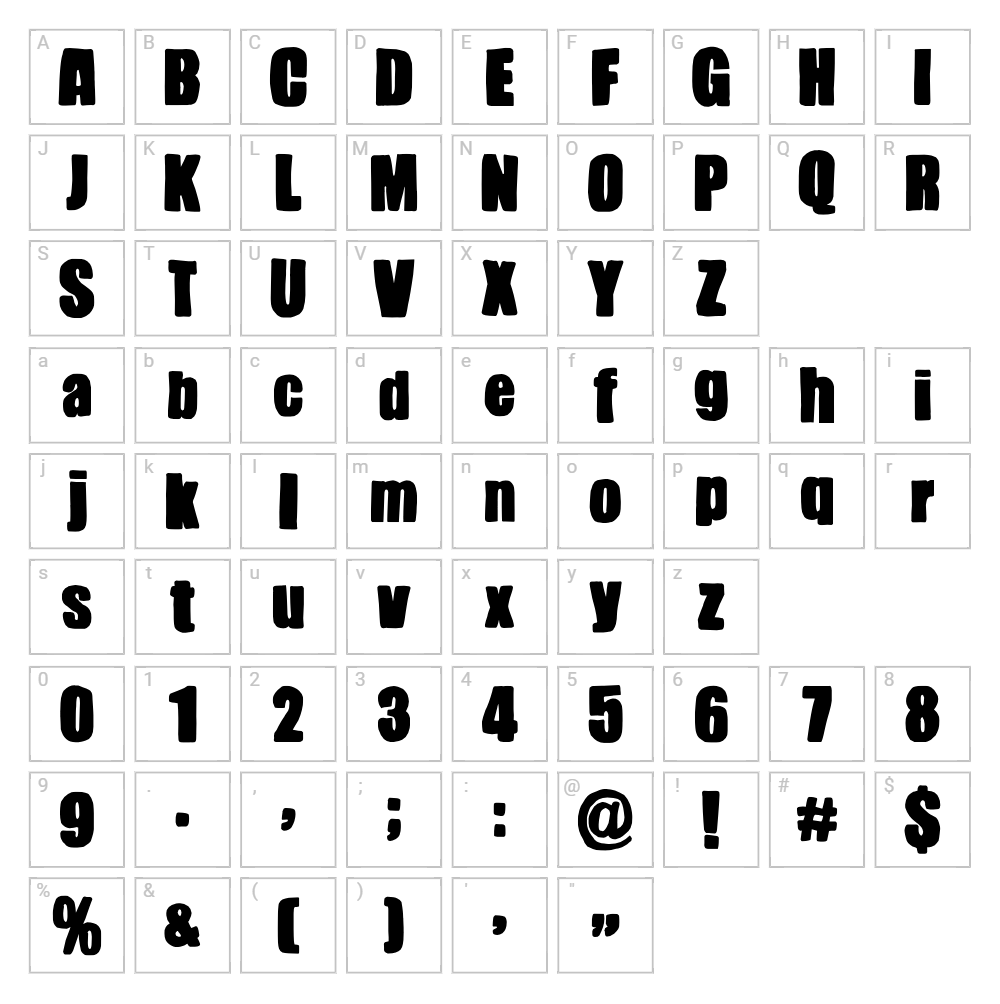
Character Map
Download Super Impacto Font
Downloads as a ZIP file. Check the license notes on this page before commercial use.
Font Files
- Super Impacto.otf
Font Details
- License:Free for personal use
- Author:
About Super Impacto
Super Impacto is a bold, eye-catching display font designed by Woodcutter that commands attention with its strong, geometric letterforms and powerful presence. The font features thick, confident strokes with a modern edge, making it ideal for designers who need maximum visual impact on any project. Its distinctive character styling and chunky proportions give it a contemporary feel that works equally well in print and digital applications. Super Impacto stands out as a font that brings personality and punch to headlines, logos, and branding materials.
Best Uses for Super Impacto
Super Impacto excels in logo design, poster creation, and eye-catching headlines where bold typography is essential. It's particularly well-suited for t-shirt designs, vinyl decals, Cricut projects, and merchandise branding where strong visual hierarchy matters. The font also performs beautifully in music or entertainment marketing, social media graphics, and any design requiring dramatic visual emphasis.
What Fonts Pair Well With Super Impacto?
Super Impacto pairs exceptionally well with Open Sans, a clean, modern sans-serif that provides excellent readability alongside its bold companion. For a more elegant contrast, combine it with Playfair Display, a sophisticated serif that balances Super Impacto's aggressive energy with refined restraint. Another excellent pairing is Montserrat, a geometric sans-serif that complements Super Impacto's modern aesthetic while offering versatility across different font weights.
License & Commercial Use
Super Impacto is available for both personal and commercial use, allowing you to confidently use it for client projects, logo design, branding, print materials, digital media, web design, mobile apps, and merchandise production. You are permitted to create and sell products featuring this font, including t-shirts, mugs, prints, and other commercial goods. The only restriction is that you cannot resell or redistribute the original font files themselves. Always credit Woodcutter as the designer when appropriate, and review the full license terms for any specific use case questions.
Frequently Asked Questions
Is Super Impacto free for commercial use?
Yes, Super Impacto is completely free for commercial use. You can use it for client work, branding, merchandise, digital products, and any other commercial project without purchasing a license or paying fees. The only restriction is reselling the font file itself.
What file formats does Super Impacto come in?
Super Impacto is typically available in standard font formats including TTF (TrueType) and OTF (OpenType), which are compatible with Windows, Mac, and most design software including Adobe Creative Suite, Canva, Cricut Design Space, and web platforms.
What fonts pair well with Super Impacto?
Super Impacto pairs beautifully with Open Sans for clean contrast, Playfair Display for elegant balance, and Montserrat for modern cohesion. These combinations allow you to use Super Impacto's boldness for headlines while maintaining readability in body text and supporting design elements.
Can I use Super Impacto for Cricut projects?
Absolutely. Super Impacto works wonderfully in Cricut Design Space for creating vinyl decals, heat transfer designs, and cut files. Its bold, geometric forms translate perfectly to physical crafts, and you can enhance your designs further using the VectorDad Word Art Generator and Curved Text Generator for custom SVG creations.
How to Install Super Impacto
- Download the Super Impacto font file from VectorDad.com to your computer.
- Unzip the downloaded folder to extract the font file (usually a .ttf or .otf file).
- Double-click the font file to open the font preview window on your operating system.
- Click Install to add the font to your system's font library (Windows) or Font Book (Mac).
- Restart your design applications and Super Impacto will be available in all font menus, including Adobe apps, Canva, Cricut Design Space, and other creative software.
Use Super Impacto With VectorDad Tools
Take your Super Impacto designs to the next level by using the VectorDad Word Art Generator to create stunning SVG word art files perfect for Cricut cutting and vinyl projects. Enhance curved text layouts and circular typography with the Curved Text Generator to add dynamic visual effects to your creative designs.
Make Your Own Font
Like the look of Super Impacto but want letters in your own style? Draw or trace each character as an SVG, then turn the set into an installable .ttf font with our SVG to TTF font maker. It runs in your browser, with no signup.


