
The Blue Jay Font – Free Download (OTF, TTF, SVG)

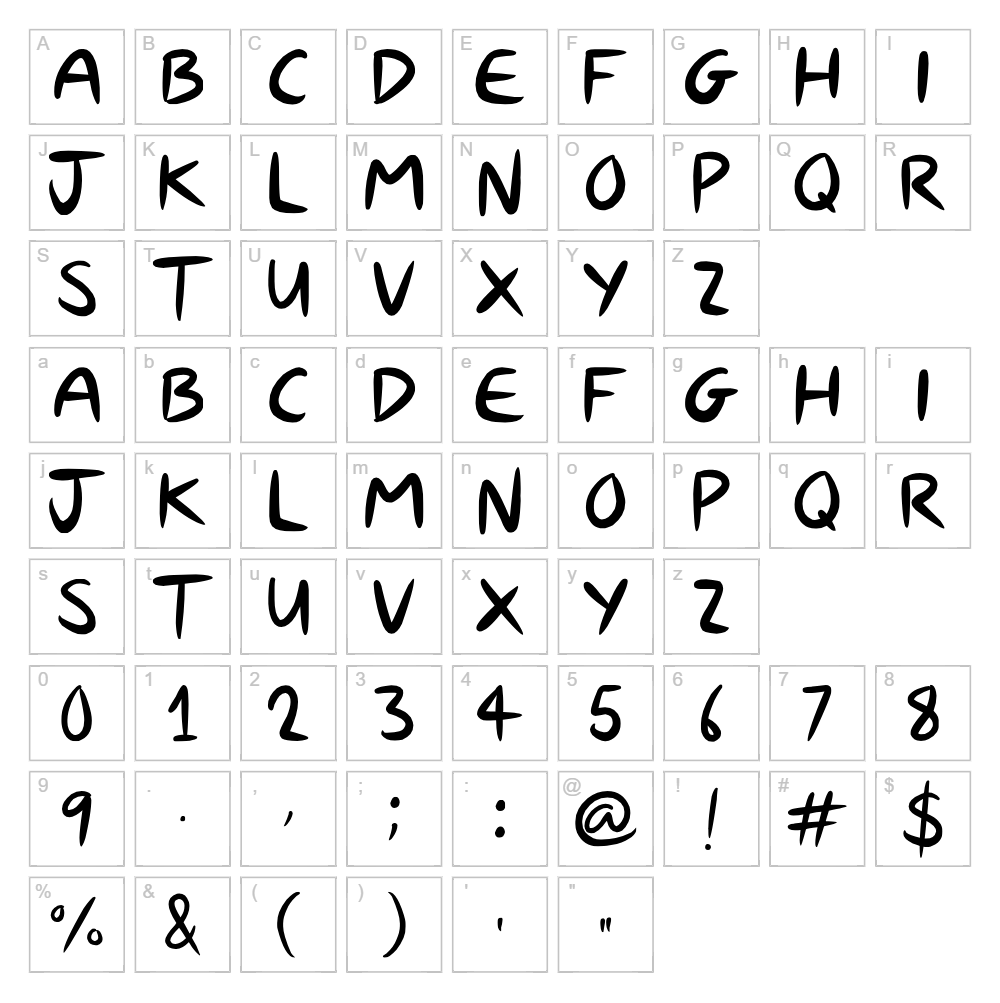
Character Map
Download The Blue Jay Font
Downloads as a ZIP file. Check the license notes on this page before commercial use.
Font Files
- The Blue Jay.otf
Font Details
- License:Free for personal use
- Author:
About The Blue Jay
The Blue Jay is a charming handwritten script font created by JSH creates that captures the natural flow and personality of pen-on-paper lettering. With its organic strokes and casual letterforms, this typeface exudes warmth and approachability, making it ideal for designs that need a human touch. The subtle variations in line weight give each character a distinctive, handcrafted quality that feels genuine and inviting. Whether you're working on a personal project or seeking a font with authentic character, The Blue Jay delivers effortless elegance.
Best Uses for The Blue Jay
The Blue Jay excels in personal projects including greeting cards, handwritten-style invitations, journal covers, and craft applications. It's perfect for Cricut users creating vinyl decals, t-shirt designs, and personalized gifts that benefit from a friendly, approachable aesthetic. The font also works beautifully for small business branding, product packaging, and social media graphics where a personal, artisanal feel is desired.
What Fonts Pair Well With The Blue Jay?
Pair The Blue Jay with Open Sans or Montserrat for a modern contrast that balances handwritten warmth with clean, professional sans-serif clarity. For a more classic pairing, combine it with Lora, a serif font that complements script styles while maintaining readability in body text. All three are available free on Google Fonts.
License & Commercial Use
The Blue Jay is licensed for personal use. This means you may use the font freely in personal projects, hobbies, and non-commercial designs at no cost. For commercial applications—including logos, branding, print materials, digital designs, web projects, mobile apps, merchandise, and packaging—you must obtain a commercial license from JSH creates. Always credit JSH creates in your project when required by the license terms. Reselling or redistributing the font files is strictly prohibited under all circumstances.
Frequently Asked Questions
Is The Blue Jay free for commercial use?
No, The Blue Jay is licensed for personal use only. Commercial projects require a separate commercial license purchased from JSH creates. Contact the designer directly for licensing options.
What file formats does The Blue Jay come in?
Most fonts from independent creators like JSH creates are available in standard formats including TTF (TrueType), OTF (OpenType), and sometimes WOFF for web use. Check the download package for specific file formats included.
What fonts pair well with The Blue Jay?
Open Sans, Montserrat, and Lora are excellent pairings. See Section 3 above for detailed recommendations on combining The Blue Jay with complementary typefaces.
Can I use The Blue Jay for Cricut and vinyl cutting projects?
Yes! The Blue Jay works wonderfully with Cricut machines for personal projects like vinyl decals and t-shirt designs. For commercial products sold to customers, you'll need a commercial license from JSH creates.
How to Install The Blue Jay
- Download The Blue Jay font file from VectorDad.com or the designer's website.
- Unzip the downloaded folder to access the font file (typically .ttf or .otf format).
- Double-click the font file to open the font preview window on your computer.
- Click the Install button to add The Blue Jay to your system fonts.
- Restart your design applications, and The Blue Jay will appear in your font menu alongside all other installed typefaces.
Use The Blue Jay With VectorDad Tools
Enhance your Cricut projects by using The Blue Jay with the VectorDad Word Art Generator, which instantly converts text into scalable SVG designs ready for cutting. For circular or curved layouts, try the Curved Text Generator to bend The Blue Jay's handwritten charm into dynamic, professional-looking designs.
Make Your Own Font
Like the look of The Blue Jay but want letters in your own style? Draw or trace each character as an SVG, then turn the set into an installable .ttf font with our SVG to TTF converter. It runs in your browser, with no signup.


