
Winnie the Pooh Font – Free Download (OTF, TTF, SVG)

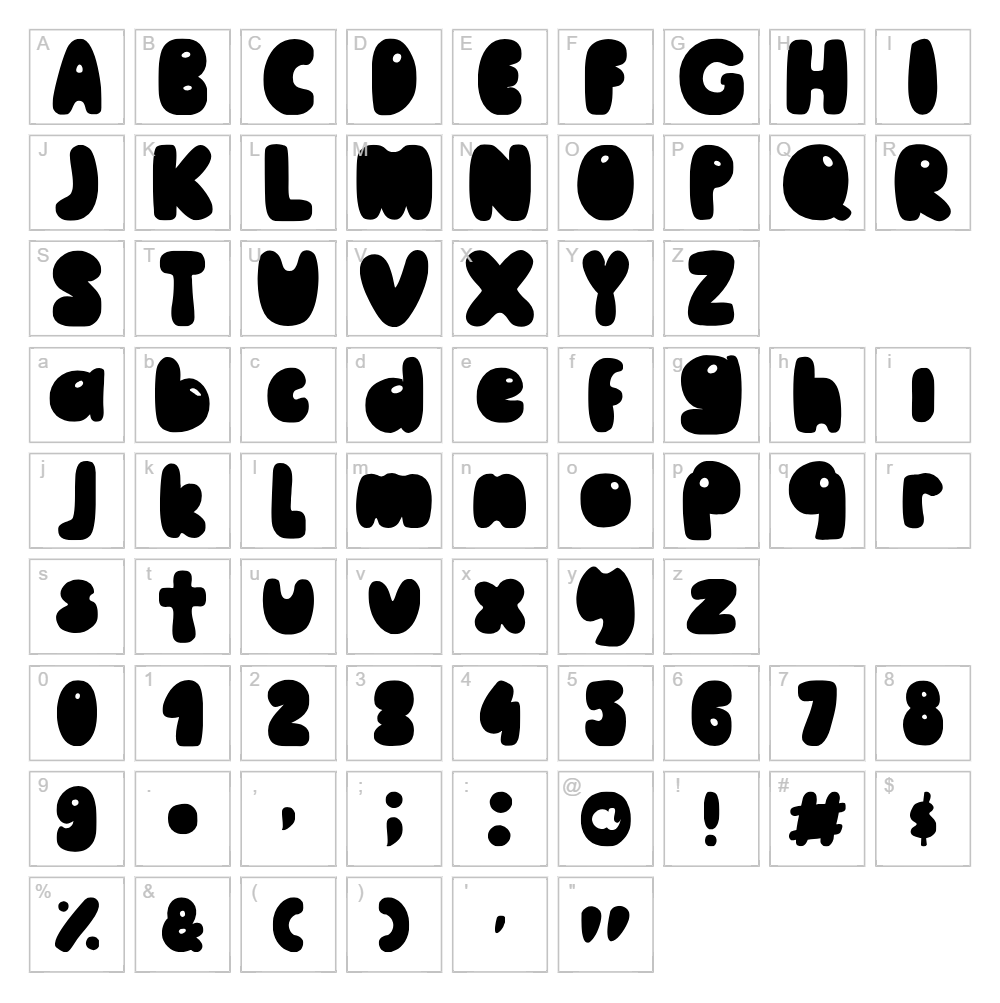
Character Map
Download Winnie the Pooh Font
Downloads as a ZIP file. Check the license notes on this page before commercial use.
Font Files
- MaiLe-Pooh-Regular.otf
- MaiLe-Pooh-Regular.ttf
Font Details
- License:Free for personal use
- Author:
About Winnie the Pooh
Winnie the Pooh is a delightfully whimsical display font created by Art of Mai that captures a playful, groovy aesthetic perfect for creative projects that demand personality and charm. With its flowing letterforms and organic curves, this typeface exudes a vintage-inspired warmth while maintaining modern versatility. The font's distinctive character makes it ideal for designers seeking to add a touch of nostalgic fun to their work without sacrificing legibility. Whether you're designing for print or digital, Winnie the Pooh brings an instantly recognizable, friendly energy to any project.
Best Uses for Winnie the Pooh
Winnie the Pooh excels in branding projects, logo design, and creative merchandising where a distinctive, playful voice is essential. This font is particularly effective for t-shirt designs, vinyl decals, Cricut craft projects, and custom signage that benefits from a groovy, eye-catching aesthetic. It's also perfect for editorial headers, greeting card designs, social media graphics, and any project where warmth and personality should take center stage.
What Fonts Pair Well With Winnie the Pooh?
Winnie the Pooh pairs beautifully with clean, modern sans-serif fonts that provide balance to its elaborate personality. Consider pairing it with Roboto or Open Sans from Google Fonts for body text and secondary elements, creating a harmonious contrast between decorative and functional typography. For a more refined pairing, Merriweather offers serif elegance that complements Winnie the Pooh's vintage charm while maintaining excellent readability.
Another soft, friendly character font is the Hello Kitty font.
License & Commercial Use
Winnie the Pooh is 100% free for commercial use, allowing designers and businesses to use the font in logos, branding materials, print projects, digital designs, web pages, applications, and merchandise without restriction. You may use this font to create products for sale, including branded merchandise, custom apparel, vinyl decals, and Cricut projects for commercial purposes. Attribution to Art of Mai is appreciated but not required. However, you may not resell, redistribute, or re-license the font file itself. Always verify licensing terms on the original foundry page for the most current information.
Frequently Asked Questions
Is Winnie the Pooh free for commercial use?
Yes, Winnie the Pooh is 100% free for commercial use. You can use it in logos, branding, merchandise, print materials, digital designs, websites, and applications without paying any licensing fees.
What file formats does Winnie the Pooh come in?
Winnie the Pooh typically comes in standard font file formats including TTF (TrueType) and OTF (OpenType). These formats are compatible with Windows, Mac, and most design software including Adobe Creative Suite, Cricut Design Space, and Silhouette Studio.
What fonts pair well with Winnie the Pooh?
For complementary pairings, consider Roboto, Open Sans, or Merriweather. These fonts provide excellent balance when used alongside Winnie the Pooh's playful aesthetic. See Section 3 above for detailed pairing suggestions and reasoning.
Can I use Winnie the Pooh for Cricut and vinyl cutting projects?
Absolutely! Winnie the Pooh is perfect for Cricut projects and vinyl decal designs. Once installed on your computer, you can import it into Cricut Design Space and use it to create custom cut files for T-shirts, decals, home décor, and other crafted products for personal or commercial sale.
How to Install Winnie the Pooh
- Download the Winnie the Pooh font file from VectorDad or the original source.
- Unzip the downloaded folder to access the font files.
- Double-click the font file (TTF or OTF) to open the font preview window.
- Click Install to add the font to your system library.
- Restart your design applications and the font will be available in your font dropdown menus across all programs.
Use Winnie the Pooh With VectorDad Tools
Enhance your Winnie the Pooh designs using the VectorDad Word Art Generator, which allows you to create stunning word art compositions and export them as SVG files perfect for Cricut projects. Combine this with the Curved Text Generator to bend and shape your Winnie the Pooh text along custom paths, unlocking creative possibilities for labels, logos, and decorative designs.
Make Your Own Font
Like the look of Winnie the Pooh but want letters in your own style? Draw or trace each character as an SVG, then turn the set into an installable .ttf font with our SVG to TTF font maker. It runs in your browser, with no signup.
Similar Fonts
If you like Winnie the Pooh, you may also like these free fonts:


