
Hello Brownie Font – Free Download (OTF, TTF, SVG)

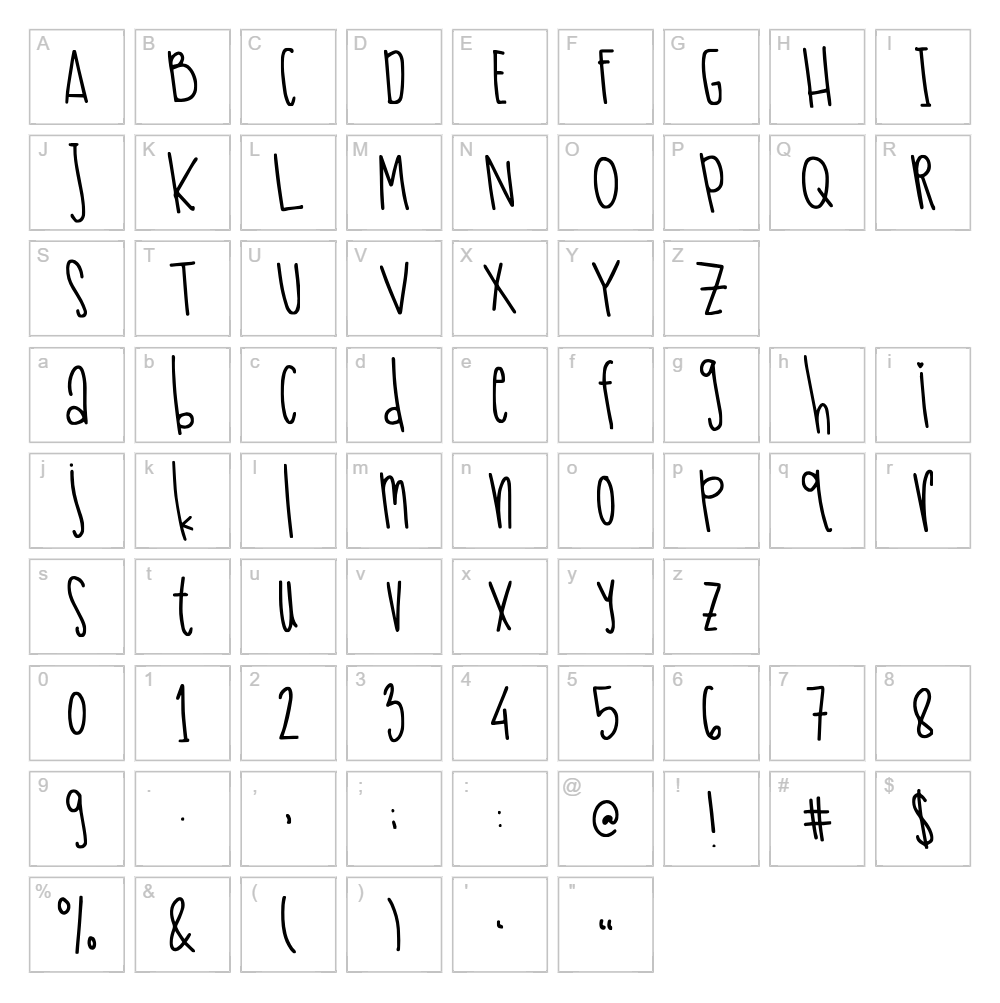
Character Map
Download Hello Brownie Font
Downloads as a ZIP file. Check the license notes on this page before commercial use.
Font Files
- HelloBrownie.otf
Font Details
- License:Free for personal use
- Author:
About Hello Brownie
Hello Brownie is a warm, organic handwritten script font created by The Ocean Studio designer Laire Banyu Sandi Pawenang. With its flowing letterforms and natural pen-like strokes, this typeface captures the casual elegance of handwritten text while maintaining excellent readability. The font's friendly character makes it feel personal and approachable, perfect for adding a human touch to digital and print projects. Each letter is crafted with subtle variation, giving your designs an authentic, hand-lettered aesthetic.
Best Uses for Hello Brownie
Hello Brownie excels in branding projects, greeting cards, and personalized invitations where a friendly, handwritten feel is essential. This font is ideal for Cricut crafting—from custom t-shirt designs and vinyl decals to home décor projects and personalized gifts. It also works beautifully for packaging design, social media graphics, and editorial headers where you want to convey warmth and authenticity.
What Fonts Pair Well With Hello Brownie?
Hello Brownie pairs beautifully with clean, modern sans-serif fonts that provide contrast and readability. Consider pairing it with Montserrat or Poppins for contemporary designs, or Playfair Display for a more elegant, upscale aesthetic. The combination of Hello Brownie's handwritten warmth with a structured sans-serif creates visual balance and hierarchy in any layout.
License & Commercial Use
Hello Brownie is available for personal use, and commercial licensing may be available depending on the specific terms set by The Ocean Studio. For commercial projects including logo design, print materials, digital assets, web design, applications, and merchandise, you should verify the current licensing terms. Always provide appropriate credit to designer Laire Banyu Sandi Pawenang and The Ocean Studio. Reselling or redistributing the font files in their original form is strictly prohibited.
Frequently Asked Questions
Is Hello Brownie free for commercial use?
Hello Brownie is designated as free for personal use. Before using it in commercial projects, check the specific license terms or contact The Ocean Studio to confirm whether commercial licensing is available or required for your intended use.
What file formats does Hello Brownie come in?
Hello Brownie is typically available in standard font formats such as TTF (TrueType Font) and OTF (OpenType Font), which are compatible with Windows, macOS, and most design applications including Adobe Creative Suite and Cricut Design Space.
What fonts pair well with Hello Brownie?
Hello Brownie pairs well with modern sans-serifs like Montserrat and Poppins for a contemporary look, or with Playfair Display for a more elegant style. See the Font Pairing section above for detailed recommendations.
Can I use Hello Brownie for Cricut projects?
Yes, Hello Brownie works wonderfully with Cricut Design Space for vinyl decals, t-shirt designs, and custom cutting projects. Upload the font or use it directly in Design Space to create personalized crafts with that authentic handwritten feel.
How to Install Hello Brownie
- Download the Hello Brownie font file from VectorDad.com to your computer.
- Unzip the downloaded file to extract the font file (usually a .ttf or .otf file).
- Double-click the font file to open the font preview window.
- Click Install (or "Install Font") to add Hello Brownie to your system font library.
- Restart your applications and Hello Brownie will be available in the font menu of all your design software, including Cricut Design Space, Adobe apps, and Microsoft Office.
Use Hello Brownie With VectorDad Tools
Maximize your Hello Brownie designs with the VectorDad Word Art Generator, which lets you create eye-catching word art in seconds—perfect for t-shirt designs, vinyl decals, and Cricut projects. For even more creative possibilities, try the Curved Text Generator to bend and shape Hello Brownie along custom curves, ideal for logos, circular designs, and professional branding mockups.
Make Your Own Font
Like the look of Hello Brownie but want letters in your own style? Draw or trace each character as an SVG, then turn the set into an installable .ttf font with our SVG to TTF font maker. It runs in your browser, with no signup.


