
String Font – Free Download (OTF, TTF, SVG)

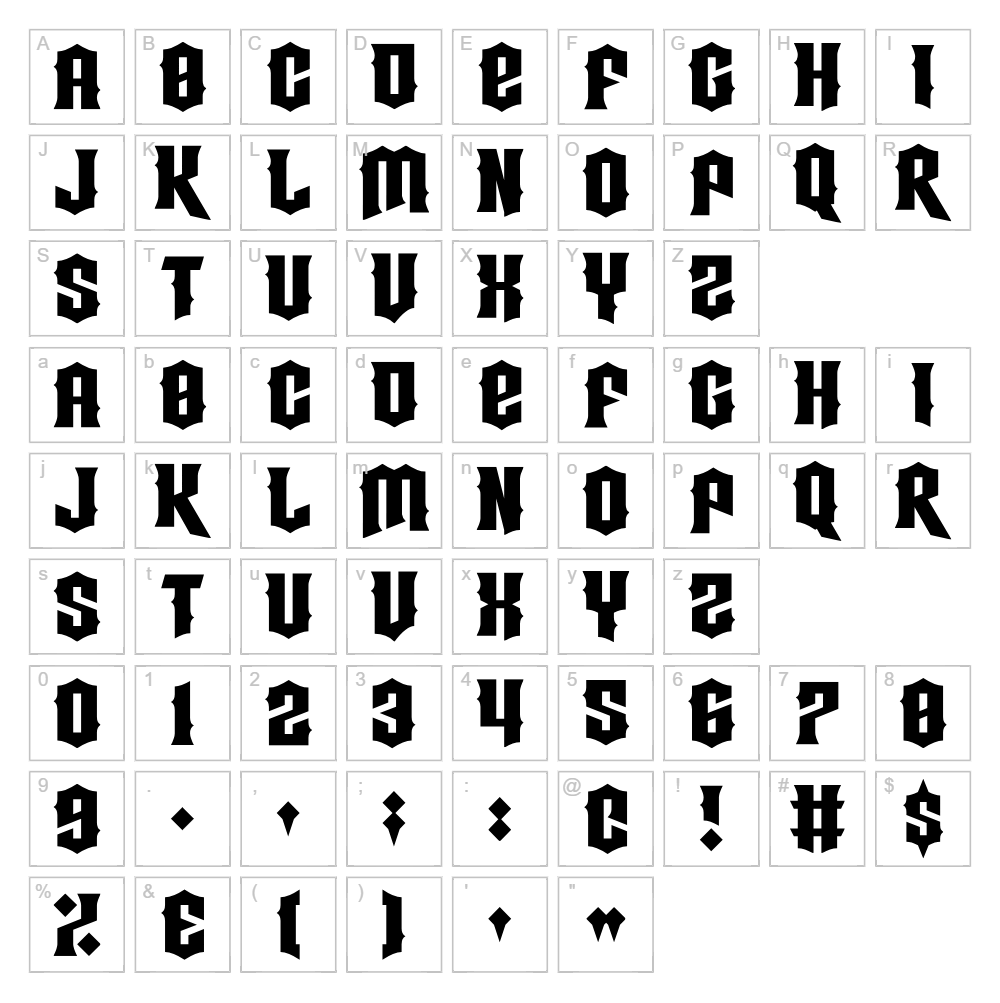
About String
String is a striking gothic font designed by Chequered Ink that combines modern sensibilities with bold, dramatic letterforms. Its angular strokes and geometric construction create a contemporary edge perfect for designers seeking impact without sacrificing readability. The font's personality lies in its clean lines and structural precision, making it equally at home in edgy branding or experimental typography projects. String delivers visual weight while maintaining the refined aesthetic that appeals to both traditional and digital designers.
Best Uses for String
String excels in logo design, poster art, and bold headline applications where its gothic-modern style can command attention. It's particularly suited for music and entertainment branding, gaming graphics, and Cricut vinyl decal projects that demand visual impact. Whether you're crafting t-shirt designs, album covers, or digital signage, String brings distinctive character to any project requiring strong typographic presence.
What Fonts Pair Well With String?
String pairs beautifully with clean, geometric sans-serifs that balance its boldness. Consider pairing it with Roboto or Open Sans for body text and supporting elements, both available free on Google Fonts. For a more refined contrast, Playfair Display creates an elegant secondary hierarchy while maintaining modern appeal.
License & Commercial Use
String is licensed for free personal use and is available for commercial applications including logo design, print materials, digital publishing, web design, mobile applications, and merchandise production. You are welcome to use String in client work, business branding, and commercial products without additional licensing fees. Proper credit to Chequered Ink is appreciated. However, reselling or redistributing the font files themselves is not permitted under this license.
Frequently Asked Questions
Is String free for commercial use?
Yes, String by Chequered Ink is free for commercial use, including logos, print design, web projects, applications, and merchandise. We recommend crediting the designer when possible.
What file formats does String come in?
String is typically available in TTF (TrueType) and OTF (OpenType) formats, compatible with Windows, Mac, and most design software including Adobe Creative Suite, Affinity applications, and Cricut Design Space.
What fonts pair well with String?
String pairs well with geometric sans-serifs like Roboto or Open Sans for body copy, or with Playfair Display for an elegant secondary font. See our dedicated pairing section above for detailed recommendations.
Can I use String for Cricut projects?
Absolutely! String works great for Cricut vinyl decals, t-shirt designs, and cut projects. You can upload the font directly to Cricut Design Space, or use our free VectorDad Word Art Generator to create instant SVG files ready for cutting.
How to Install String
- Download the String font file from the link above and save it to your computer.
- Unzip the downloaded folder to access the font files (.ttf or .otf).
- Double-click the font file you wish to install to open the font preview window.
- Click the Install button to add String to your system fonts.
- Restart your design application, and String will appear in the font menu alongside all your other fonts.
Use String With VectorDad Tools
Unlock String's full potential with the VectorDad Word Art Generator, which instantly converts your text into ready-to-cut SVG files perfect for Cricut projects. For curved designs and circular text layouts, try our Curved Text Generator to add dimension and professional styling to your String typography.


