
Xtreem Font – Free Download (OTF, TTF, SVG)

Character Map

Font Files
- XtreemFat_PERSONAL_USE.ttf
- XtreemMedium_PERSONAL_USE.ttf
- XtreemThin_PERSONAL_USE.ttf
Font Details
-
License:Free for personal use
-
Author:
About Xtreem
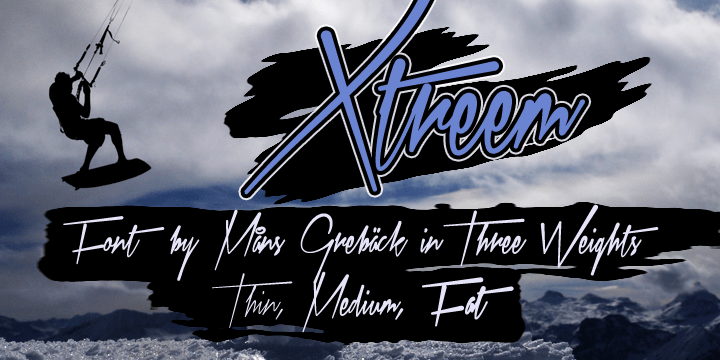
Xtreem is a bold, energetic handwritten font created by designer Mans Greback that captures the raw, expressive quality of hand-drawn lettering with dramatic flair. The font features dynamic strokes with varying weights and organic irregularities that give it personality and movement, making it stand out from more formal typefaces. With its playful yet confident character, Xtreem conveys creativity and authenticity, perfect for designs that demand visual impact. The handwritten aesthetic combined with deliberate letterform construction creates a unique balance between casual friendliness and contemporary edge.
Best Uses for Xtreem
Xtreem excels in projects where personality and visual impact are priorities, including logo design, branding, poster art, and eye-catching headlines. The font works beautifully for t-shirt designs, vinyl decals, Cricut crafting projects, and social media graphics where you want to grab attention. It's also ideal for editorial layouts, album covers, and event signage where a modern, youthful voice enhances the overall message.
What Fonts Pair Well With Xtreem?
Xtreem pairs excellently with clean, minimal sans-serif fonts that provide visual balance. Consider pairing it with Montserrat or Roboto from Google Fonts for a modern contrast, or use Lora as a serif option to add sophistication to body copy while Xtreem commands attention as a display font.
License & Commercial Use
Xtreem is free for personal and commercial use, meaning you can confidently use it in logos, branding materials, print projects, digital designs, websites, mobile applications, and merchandise without licensing fees. Commercial applications including product packaging, client work, and advertising are all permitted under this license. You must provide credit to designer Mans Greback in your project or design file. However, you may not resell, redistribute, or repackage the font files themselves as a product.
Frequently Asked Questions
Is Xtreem free for commercial use?
Yes, Xtreem is completely free for commercial use. You can use it in logos, branding, print materials, digital projects, websites, apps, and merchandise without purchasing a license. Always credit the designer Mans Greback in your project.
What file formats does Xtreem come in?
Xtreem is available in standard font formats including TrueType (.ttf) and OpenType (.otf), making it compatible with Windows, Mac, and most design software including Adobe Creative Suite, Cricut Design Space, and other creative applications.
What fonts pair well with Xtreem?
Xtreem pairs best with clean sans-serif fonts like Montserrat or Roboto, or serif options like Lora. These complementary typefaces provide visual balance and readability when used alongside Xtreem's bold display characteristics.
Can I use Xtreem for Cricut projects?
Absolutely! Xtreem works great for Cricut projects including vinyl decals, heat transfer designs, and paper crafts. Install the font on your computer, then use it in Cricut Design Space to create custom cuts and designs for your creative projects.
How to Install Xtreem
- Download the Xtreem font file from VectorDad.com to your computer.
- Unzip or extract the font file from its compressed folder.
- Double-click the font file (typically named Xtreem.ttf or Xtreem.otf).
- Click the "Install" button when the font preview window appears.
- The font is now installed and ready to use in all your design applications and software.
Use Xtreem With VectorDad Tools
Maximize Xtreem's potential by using it with the VectorDad Word Art Generator, which lets you create stunning text effects and convert your designs into SVG files perfect for Cricut projects. Take your designs further with the Curved Text Generator to bend and shape Xtreem lettering along custom paths for truly unique vinyl decals and crafted designs.


