
Planets Font – Free Download (OTF, TTF, SVG)

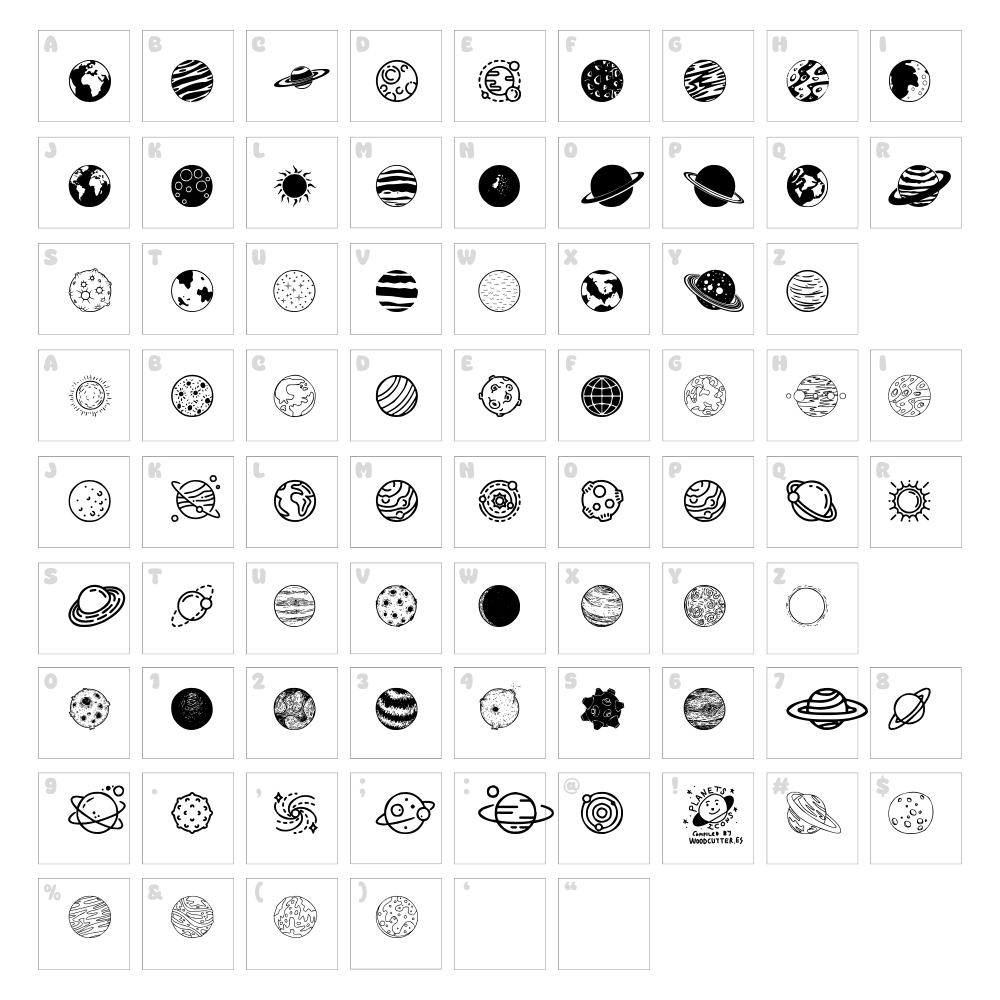
Character Map
Download Planets Font
Downloads as a ZIP file. Check the license notes on this page before commercial use.
Font Files
- Planets.otf
Font Details
- License:Free for personal use
- Author:Woodcutter
About Planets
Planets is a captivating dingbat font from Woodcutter that brings otherworldly charm to your creative projects. This font features a collection of alien and cosmic-themed glyphs, each rendered with clean, playful strokes that evoke a sense of space exploration and wonder. The characters are boldly designed with distinctive personalities, making them perfect for adding a touch of extraterrestrial flair to any design. Whether you're crafting sci-fi themed content or simply want to inject some cosmic energy into your work, Planets delivers a unique visual experience that stands out from conventional typefaces.
Best Uses for Planets
Planets excels in designs that call for a playful, futuristic aesthetic. Use it for logo design, branding identity systems, t-shirt graphics, vinyl decal projects for Cricut machines, party invitations, poster design, and themed event materials. It's also excellent for web headers, social media graphics, and any project where you want to communicate a sense of fun, imagination, or cosmic adventure.
What Fonts Pair Well With Planets
Planets pairs beautifully with Roboto, a modern sans-serif that provides clean readability alongside the playful dingbats. For a more elegant combination, try Playfair Display, a high-contrast serif that balances Planets' whimsy with sophistication. Open Sans is another excellent pairing option, offering a friendly, versatile counterpoint to the font's alien character.
License & Commercial Use
Planets is 100% free for commercial use. You may use this font to create logos, branding materials, print publications, digital designs, websites, mobile applications, merchandise, and more without purchasing a license. Attribution to Woodcutter is appreciated but not required. However, you may not resell, redistribute, or repackage the font files themselves. Always check the font's official license page for the most current terms and conditions.
Frequently Asked Questions
Is Planets free for commercial use?
Yes, Planets is completely free for commercial use. You can use it in logos, branding, print materials, digital projects, merchandise, and any other commercial application without paying a license fee or providing attribution.
What file formats does Planets come in?
Most dingbat fonts, including Planets, are available in standard formats such as TrueType (.ttf), OpenType (.otf), and sometimes web font formats (.woff). Check the download package for specific format options available with this font.
What fonts pair well with Planets?
Planets pairs well with clean, modern sans-serifs like Roboto and Open Sans, which provide readable body text alongside the playful dingbats. For more elegant designs, Playfair Display offers a sophisticated serif pairing that balances visual interest.
Can I use Planets in Cricut Design Space?
Yes, you can install Planets on your computer and use it within Cricut Design Space after installation. For maximum versatility, consider converting Planets characters into SVG format using online tools for more advanced design possibilities and easier manipulation.
How to Install Planets
- Download the Planets font file from VectorDad.com to your computer.
- Unzip the downloaded file if it's in a compressed folder format.
- Double-click the font file (.ttf or .otf) to open the font preview window.
- Click Install to add Planets to your system font library.
- Restart your design applications, and Planets will be available in your font menu across all software.
Use Planets With VectorDad Tools
Maximize the creative potential of Planets with the VectorDad Word Art Generator, which transforms your text into eye-catching word art designs perfect for printing and cutting. Take your projects further with the Curved Text Generator to bend and shape Planets characters along custom paths for professional Cricut SVG projects.
Make Your Own Font
Like the look of Planets but want letters in your own style? Draw or trace each character as an SVG, then turn the set into an installable .ttf font with our SVG to TTF font maker. It runs in your browser, with no signup.
Similar Fonts
If you like Planets, you may also like these free fonts:


