
RCR Font – Free Download (OTF, TTF, SVG)

About RCR
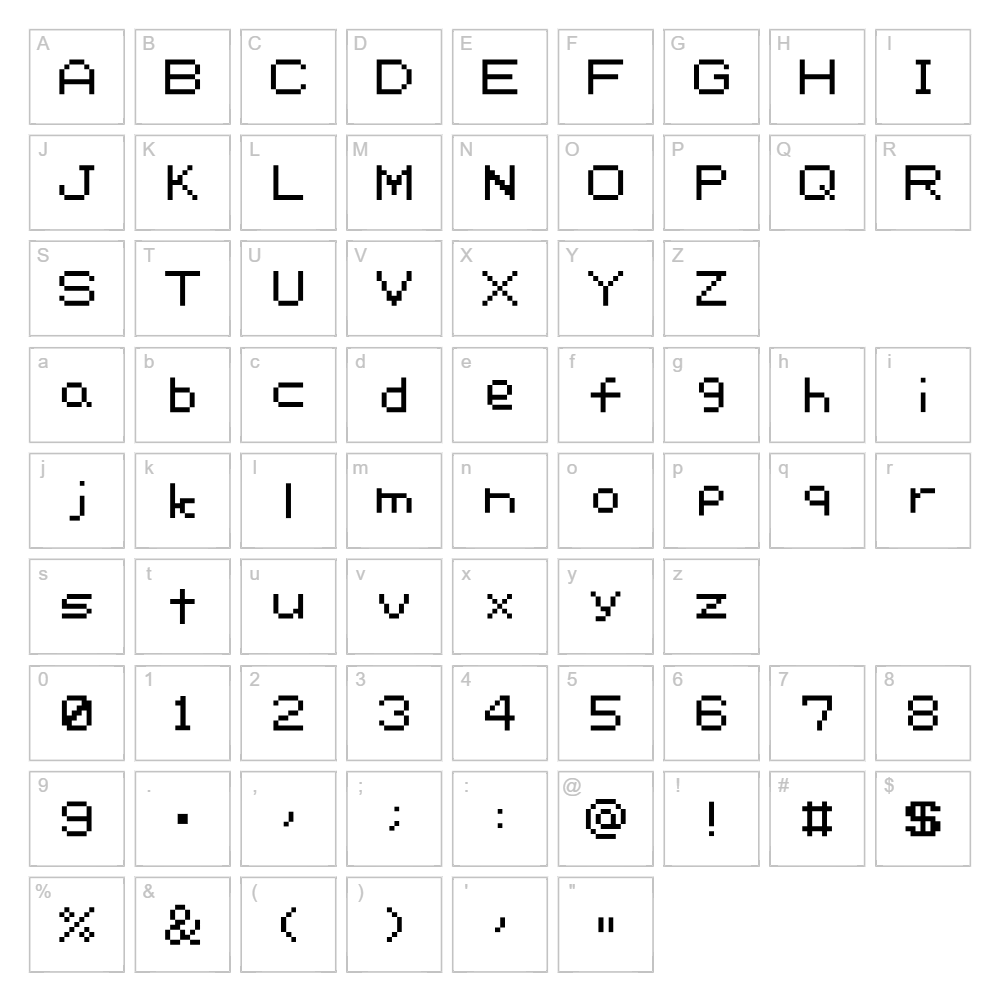
RCR is a distinctive bitmap font designed by ldvhl that captures the retro charm of early digital typography. With its pixelated, blocky letterforms and compact character spacing, this font delivers a nostalgic aesthetic that works perfectly for vintage-inspired projects. The clean, geometric construction gives RCR a modern edge despite its throwback style, making it equally at home in contemporary design contexts. What sets RCR apart is its ability to balance playful personality with legibility across both digital and print applications.
Best Uses for RCR
RCR excels in retro branding, video game graphics, and nostalgic poster design where that pixel-perfect aesthetic adds authentic character. This font is ideal for Cricut cutting projects, vinyl decal work, and t-shirt graphics where bold, compact letterforms command attention. It's also perfect for social media graphics, album artwork, and editorial designs that embrace a deliberately vintage or cyberpunk visual direction.
What Fonts Pair Well With RCR?
For complementary pairing, consider Roboto Mono from Google Fonts, which shares RCR's geometric precision while offering a more contemporary feel for body text and captions. Space Mono is another excellent pairing, blending monospace structure with modern proportions to balance RCR's retro personality. For serif contrast, IBM Plex Serif provides elegant counterpoint while maintaining the technical precision that RCR embodies.
License & Commercial Use
RCR is free for personal use, allowing you to incorporate it into personal projects, designs, and creative works at no cost. For commercial applications including logo design, merchandise, print materials, digital products, web projects, apps, and branded collateral, you must contact ldvhl directly to obtain a commercial license. When using RCR, proper credit to designer ldvhl is appreciated. Please note that reselling or redistributing the font files themselves is not permitted under any license terms.
Frequently Asked Questions
Is RCR free for commercial use?
RCR is free for personal use only. Commercial projects require a separate commercial license from ldvhl. Contact the designer directly to discuss licensing options for business, branding, merchandise, or client work.
What file formats does RCR come in?
RCR is typically available in standard font formats including OTF and TTF, making it compatible with Windows, Mac, and most design software including Adobe Creative Suite, Cricut Design Space, and web applications.
What fonts pair well with RCR?
Roboto Mono, Space Mono, and IBM Plex Serif all complement RCR beautifully. See Section 3 above for detailed pairing suggestions and why each font works as a complement.
Why does RCR have a pixelated appearance?
RCR is a bitmap font, meaning each character is designed as a grid of pixels rather than smooth curves. This pixelated aesthetic is intentional and delivers authentic retro digital character—perfect for vintage-inspired designs, gaming graphics, and nostalgic branding projects.
How to Install RCR
- Download the font file from VectorDad or the designer's site and save it to your computer.
- Unzip the folder if the download comes as a compressed file; extract all contents to a working folder.
- Double-click the font file (the .ttf or .otf file) to open the font preview window.
- Click the Install button to add RCR to your system fonts and font library.
- Restart your design applications to refresh the font list, and RCR will be available in all creative software including Adobe apps, Cricut Design Space, Canva, and more.
Use RCR With VectorDad Tools
Take RCR further with the VectorDad Word Art Generator, which lets you create custom SVG designs using RCR and export them directly for Cricut projects. Combine RCR with the Curved Text Generator to bend and warp this retro bitmap font into circular paths and dynamic compositions perfect for vinyl cutting and digital crafting.
Make Your Own Font
Like the look of RCR but want letters in your own style? Draw or trace each character as an SVG, then turn the set into an installable .ttf font with our SVG to TTF font maker. It runs in your browser, with no signup.


