
Subtext Font – Free Download (OTF, TTF, SVG)

Character Map
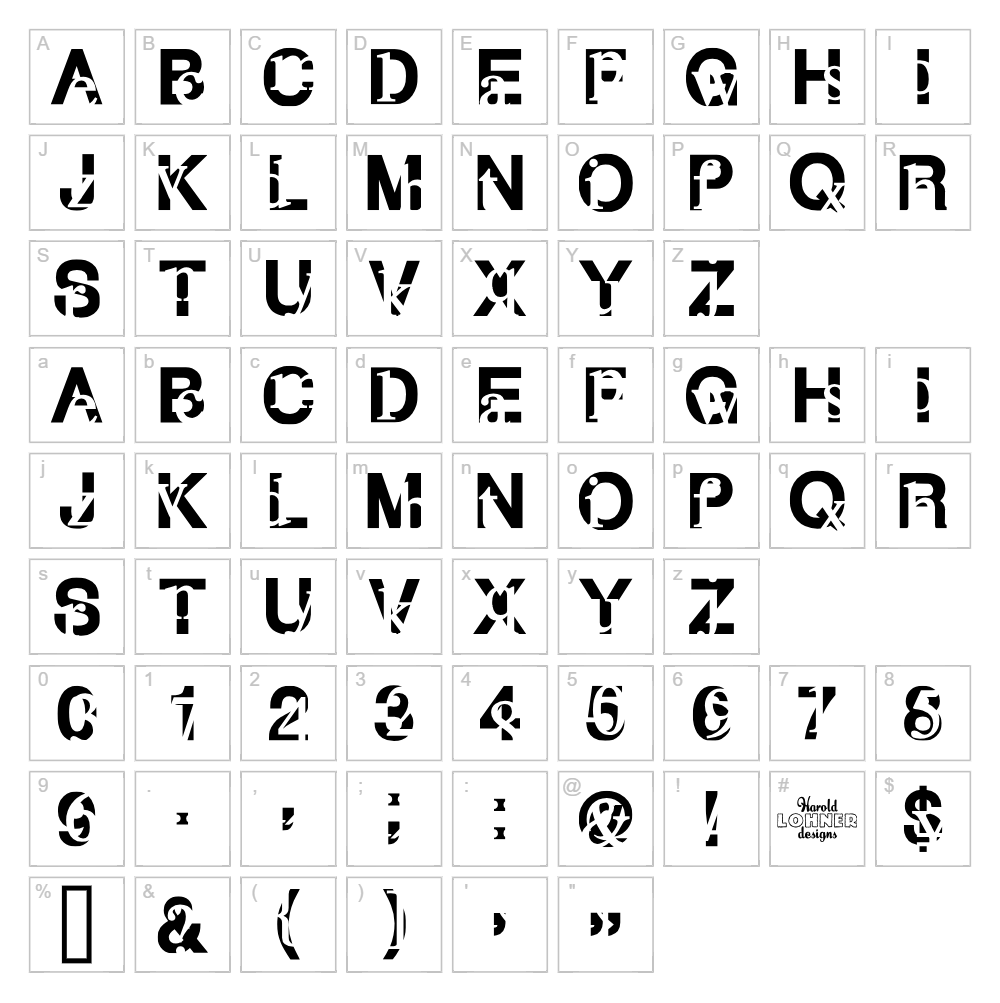
Download Subtext Font
Downloads as a ZIP file. Check the license notes on this page before commercial use.
Font Files
- SUBTEXT_.TTF
Font Details
- License:Free for personal use
- Author:
About Subtext
Subtext is a distorted, experimental typeface from Harold's Fonts that pushes the boundaries of traditional letterforms with its warped and fragmented aesthetic. Each character features irregular, glitchy strokes that create a sense of motion and creative disruption, making it instantly eye-catching and unconventional. The font's unique visual distortion gives it a distinctly modern, edgy personality perfect for designers seeking bold artistic expression. Its deliberately imperfect construction paradoxically creates a refined sense of contemporary style.
Best Uses for Subtext
Subtext excels in creative applications including music and entertainment branding, album artwork, poster design, and avant-garde fashion graphics. This font is ideal for Cricut projects, vinyl decals, and t-shirt designs where you want to make a bold artistic statement. It also works beautifully for editorial covers, experimental web design, and any project where distressed, unconventional typography enhances the visual message.
What Fonts Pair Well With Subtext?
Pair Subtext with clean, minimal typefaces to balance its experimental nature. Roboto or Open Sans (available on Google Fonts) provide excellent contrast with their neutral, geometric forms. For a serif option, Lora from Google Fonts offers elegant readability while complementing Subtext's artistic edge.
License & Commercial Use
Subtext is 100% free for commercial use, meaning you can use it in logos, branding projects, printed materials, digital publications, websites, mobile apps, and merchandise design without restrictions. You may create graphics, signage, social media content, and product packaging using this font. Credit to Harold's Fonts is appreciated but not required. However, you cannot resell the font files themselves or redistribute them as a standalone product.
Frequently Asked Questions
Is Subtext free for commercial use?
Yes, absolutely. Subtext is licensed for full commercial use, including logos, print products, digital media, websites, apps, and merchandise. You can use it for any professional or business project at no cost.
What file formats does Subtext come in?
Subtext is available in standard font formats including TTF (TrueType) and OTF (OpenType), which are compatible with Windows, Mac, and most design applications including Adobe Creative Suite, Cricut Design Space, and Silhouette Studio.
What fonts pair well with Subtext?
Subtext pairs beautifully with minimal sans-serif fonts like Roboto or Open Sans for a modern contrast, or with serif fonts like Lora for a more sophisticated balance. The key is choosing a clean, legible typeface that offsets Subtext's distorted, artistic character.
Is Subtext suitable for Cricut and vinyl cutting projects?
Yes, Subtext works well for Cricut and vinyl decal projects, though the distorted letterforms may be more effective at larger sizes where the unique character details remain visible and crisp after cutting.
How to Install Subtext
- Download the Subtext font file from this page
- Unzip the downloaded folder to access the font file
- Double-click the font file (TTF or OTF format)
- Click the "Install" button in the font preview window
- The font is now available in all your design applications, from Adobe Creative Suite to Cricut Design Space
Use Subtext With VectorDad Tools
Enhance your Subtext designs using the VectorDad Word Art Generator to create custom SVG graphics with distorted, artistic typography. Try the Curved Text Generator to bend and shape Subtext letters along curves for striking Cricut projects and vinyl decals.
Make Your Own Font
Like the look of Subtext but want letters in your own style? Draw or trace each character as an SVG, then turn the set into an installable .ttf font with our SVG to TTF font maker. It runs in your browser, with no signup.
Similar Fonts
If you like Subtext, you may also like these free fonts:


